Readers looking for 3d ai studio and Luma Genie will find a clear check of the Genie page, Luma’s current plans, and the gap between a prompt-first demo and a downloadable mesh.
If you remember typing a prompt into Luma Genie and getting a downloadable model, the current Luma site can be confusing. Here’s what its public pages show, what they don’t establish, and how to get from a written idea to a usable mesh now.
The short version
- As checked on October 29, 2026, the Genie page redirects to Luma’s homepage. Luma’s listed plans cover video and images, with no 3D generation line item.
- That is evidence that Genie is not a current, publicly listed way to make meshes. It is not an official shutdown announcement or a verified end date.
- A prompt-first tool takes words as its starting point. SupaVoxel’s current text-to-3D route shows you a generated picture before turning that picture into geometry.
- Choose your workflow by the file you need: a video or image is not a mesh you can inspect, import into a game, or prepare for printing.
What happened to the Genie page?
I would start with the narrow claim the evidence supports. SupaVoxel’s Luma AI 3D status comparison records that, on October 29, 2026, Luma’s Genie page returned a permanent redirect to its homepage. Luma’s pricing page listed Plus at $30 a month, Pro at $90 a month, and Ultra at $300 a month. Those plans priced credits around video seconds and images; none listed 3D model generation.
The surrounding pages pointed the same way. Luma’s homepage led with Ray3.2 video, Uni-1 images, and creative agents. Its former capture page showed “Page Not Found,” while its interactive-scenes page redirected to the agents page. Taken together, that makes Genie a poor starting point if your task today is to produce a downloadable mesh.
It does not tell me when Genie stopped being available, nor does it establish that every older account or app behaves the same way. The comparison found no formal shutdown announcement. “The public Genie page is gone and current plans do not list 3D generation” is more precise than assigning it an invented shutdown date.
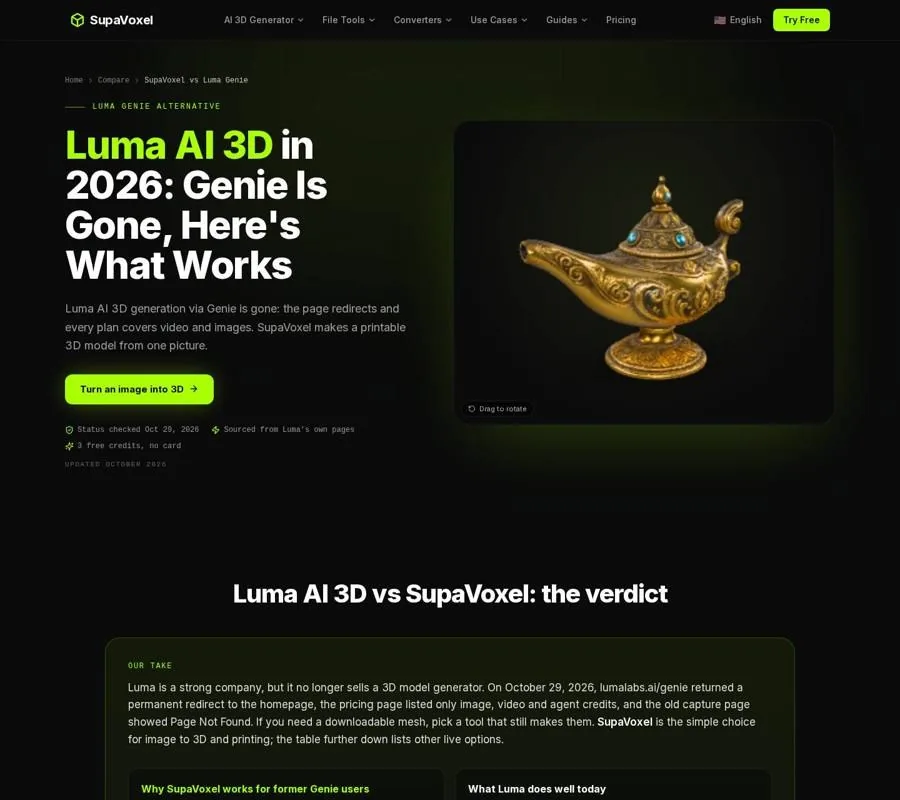
The comparison sets out the checked Genie page status alongside Luma’s listed plans.
Why a prompt is not the same as a 3D file
Genie was prompt-first: you described an object and expected a model. That sounds similar to other generative tools until you look at the output. A picture shows an object from a viewpoint; a video shows it over time. A downloadable mesh describes a surface you can rotate, inspect from behind, and bring into another application.
That distinction matters to both makers and game developers. A compelling front view does not specify the back of an object. A silhouette cannot tell a printer how a hidden joint is shaped. When a system constructs geometry from limited visual information, it has to infer what it cannot see. A clean result from the front is therefore only the beginning of inspection, not proof that the asset will work.
There is a naming trap, too. Luma’s Genie made downloadable 3D models from prompts. Google DeepMind’s Genie refers to interactive worlds rather than mesh files you download for a slicer or game project. If your goal is an STL or GLB, make the required output format part of your search—not just the word “Genie.”
How to go from a written idea to a model now
SupaVoxel’s text to 3D workflow is a useful example because it makes the intermediate image visible. Its prompt-to-picture step is in Image Studio on the Pro plan or higher. Picture-to-model generation can also start from an image you already have.
- Describe a single object, not a scene. Specify its pose, material, and overall style. For a figure, I would ask for a full-body, three-quarter view against a plain background. A scene prompt may give the image generator scenery that the geometry step then has to interpret alongside the subject.
- Judge the picture before making the mesh. Image Studio accepts prompts up to 300 characters and offers 1–4 drafts. Look for an unbroken silhouette and enough visible depth to understand the form. If the picture crops a handle or hides a prop behind the body, change the picture now rather than expecting the geometry to recover it.
- Choose geometry for the destination. SupaVoxel lists geometry-only generation at 1 credit, usually under a minute, and textured generation at 3 credits on a paid plan, typically 3 to 5 minutes. New accounts get 3 free credits at sign-up. If I intend to make a single-color print, I would inspect the untextured shape first: a surface image can make a lumpy mesh look more convincing than it is.
- Inspect the result from views the picture did not show. Rotate the model and check its back, underside, and thin features. A generated image is a design checkpoint, not a dimensional drawing. For a bracket or another part that must fit a measured assembly, use CAD rather than relying on inferred geometry.
This is not Genie’s direct prompt-to-mesh interaction. The extra picture step gives you a chance to reject an unsuitable design before spending credits on its 3D version.
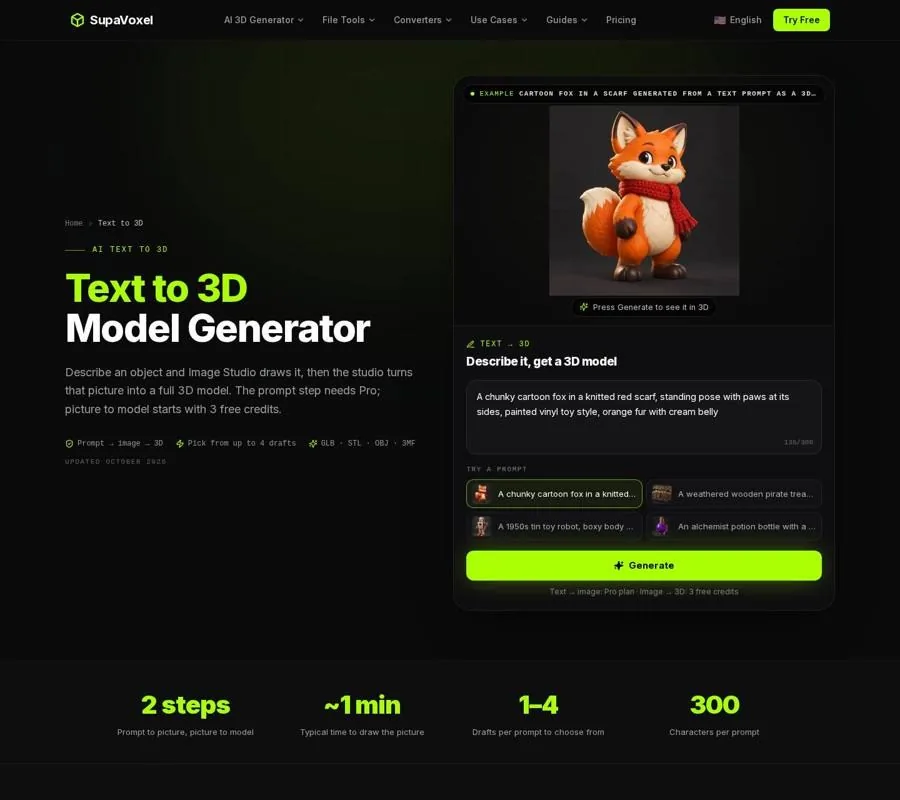
The page shows the prompt-to-picture-to-model sequence, including the choice of image drafts.
Match the output to the job
A model is useful only if you can take it where it needs to go. SupaVoxel offers GLB downloads on the free plan. Its paid plans add STL, OBJ, USDZ, and 3MF. For a game asset, texture and GLB may matter; the generated model has no rig or animation, so a moving character needs further work elsewhere.
For a single-color print, the mesh matters more than its painted appearance: STL does not carry the pictured texture into a slicer. Check whether small projections will survive printing and whether the object has a sensible contact area. A surface that looks closed on-screen can still have holes or edges shared incorrectly. A printable solid needs a closed, manifold boundary so the slicer can distinguish inside from outside.
SupaVoxel’s studio includes watertight repair, stand bases, plane cuts with pins, molds, and multi-color 3MF among its print-prep features. They are included in every paid plan from $25 a year, not part of the free credits. Those tools can prepare a mesh for printing, but they cannot guarantee that a guessed shape has the dimensions your project requires.
How to compare live alternatives
If you want to replace Genie rather than simply understand its status, compare tools on the file they deliver and the work left after generation. The best AI 3D model generator comparison evaluates image-to-3D choices by yearly cost, per-model cost, free-plan restrictions, and print preparation. Those criteria are more useful than choosing from attractive sample renders alone.
I would test with the kind of input I actually have. If that is a written concept, check whether the service truly generates a mesh from text or first asks you to approve an image. If it is a picture, check how it handles unseen surfaces. Then confirm the export format on the plan you would use. A free preview is not much help if the file you need cannot be downloaded.
Tool breadth is another real trade-off. The 3D AI Studio alternative comparison is relevant if you want to choose among different generation models. As of October 2026, 3D AI Studio offered that choice, along with rigging and an API; SupaVoxel used its own image-to-3D generator instead. For a maker focused on physical output, compare the print steps as carefully as the generated shape. The tools solve different parts of the job.

The ranking compares generators on costs, downloads, and the work needed after a model is made.
When Luma is still the right choice
A missing 3D line item does not make Luma’s current products irrelevant. If the deliverable is motion or an image rather than a mesh, its listed video and image tools address that task. The mistake is to assume that paying for a current Luma plan also restores Genie-style 3D downloads.
I would write down the deliverable before subscribing anywhere: an image to approve, a video to present, a static mesh to import, or a solid to print. That small decision separates a search for “AI 3D” into workflows you can actually compare.
FAQ
Is Luma Genie officially shut down?
The checked public pages do not establish an official shutdown date. As of October 29, 2026, the Genie page redirected to Luma’s homepage, and the listed plans had no 3D generation offering.
Can Luma’s current plans generate downloadable 3D models?
No 3D generation line item appeared on the plans checked on October 29, 2026. Those plans listed video and image use instead, so do not buy one assuming it includes Genie-style mesh generation.
Does text to 3D have to start with a picture?
Not every tool uses the same process. SupaVoxel’s route turns a prompt into a picture you can choose, then turns that picture into a model. That checkpoint helps you catch a poor silhouette or unwanted objects before generating geometry.